Increasing Aria2c’s max-connection-per-server

Ancient History#
I remember back in the early broadband days, Download Accelerator Plus was required software. It would split downloads into multiple parts and download them in parallel, doubling or even quadrupling your download speed.

OMG 760KB/s!!!
As useful as it was, it also felt rude, like I was hogging other people’s bandwidth for myself. So I rarely used it.
Modernity#
Nowadays I’ve got gigabit internet (100MB/s!!), but absolutely nothing actually reaches that speed. I wanted to try the same download accelerator trick to see if it would help. I got myself a copy of aria2c, the 'modern' equivalent of DAP. Running some experiments, I quickly discovered an issue; that it only allows up to 16 in it’s max-connection-per-server option. This limits how many connections to a single server aria2c will make when downloading a single file.[1] I know from other protocols that my internet connection can benefit from over 16 connections. Turns out this is hardcoded in the app, since 2010. In 2015 someone even commented on the line, asking "why 16?"
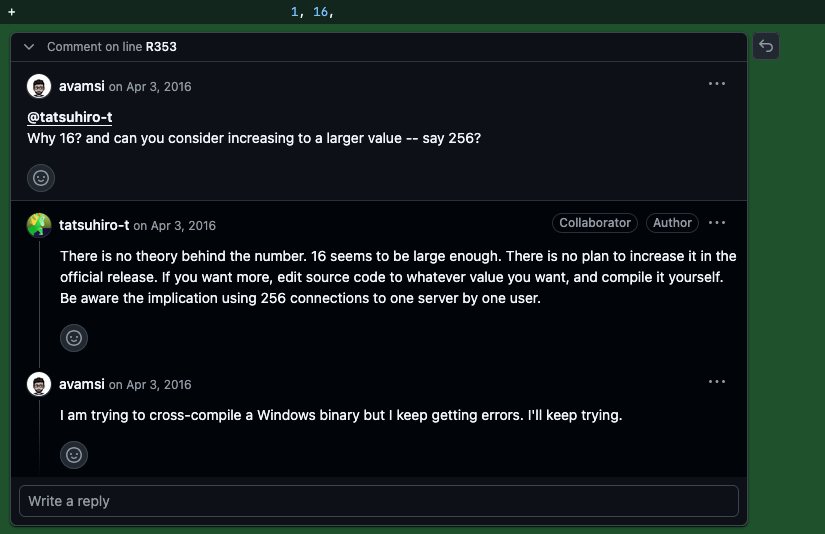
640K ought to be enough for anybody
Seems the answer is "No reason". This really triggers my inner teenager, screaming "Don’t tell me what to do!" Sure, I could edit the source and build my own version with the limit removed, but that doesn’t feel aggressive and irresponsible enough. Some folks in one of the many issue reports start just modifying the binary, which is much more like a petty middle finger. So obviously that’s what we’re gonna do.
Binary Patching with Ghidra#
To make this guide more platform agnostic, I’m going to use Ghidra. Open the aria2c executable, and let it do its default analysis when prompted.
So we know we want to change the number 16 somewhere. Simply searching for 16 (0x10 in hexadecimal) gives 25,210 results. We’re gonna need a way to narrow down to the exact 0x10 that sets the limit.
For this mgrinzPlayer showed a very clever technique using dbg on windows. They just search for the help text that explains the max-connection-per-server option. But wait, how does that help? We don’t care about what the help text says, we want the code under the hood. Ah but you see, the code that enforces the limit is part of the option parsing:
OptionHandlerFactory.cc line 439
OptionHandler* op(new NumberOptionHandler(PREF_MAX_CONNECTION_PER_SERVER,
                                          TEXT_MAX_CONNECTION_PER_SERVER,
                                          "1", 1, 16, 'x'));
TEXT_MAX_CONNECTION_PER_SERVER gets replaced with the "-x, --max-connection-per-server…" when compiled.[2] So the string for the help text is going to be real close to the number 16 that we want to change, since they are both passed as variables together.
In Ghidra’s toolbar click Search→For Strings… Just click search on the pop-up, the defaults will work for us. In the filter text box just under the list, type '-x, --max'. Click on the result and it will be shown in the main window.

Here we can see the string. Thanks to the analysis Ghidra performed, it’s identified that this string is referenced once in the program, and even works out the name, createOptionHandlers. That’s the function in OptionHandlerFactory that has the above code! Double clicking the XREF moves us to the part of createOptionHandlers that uses this string.
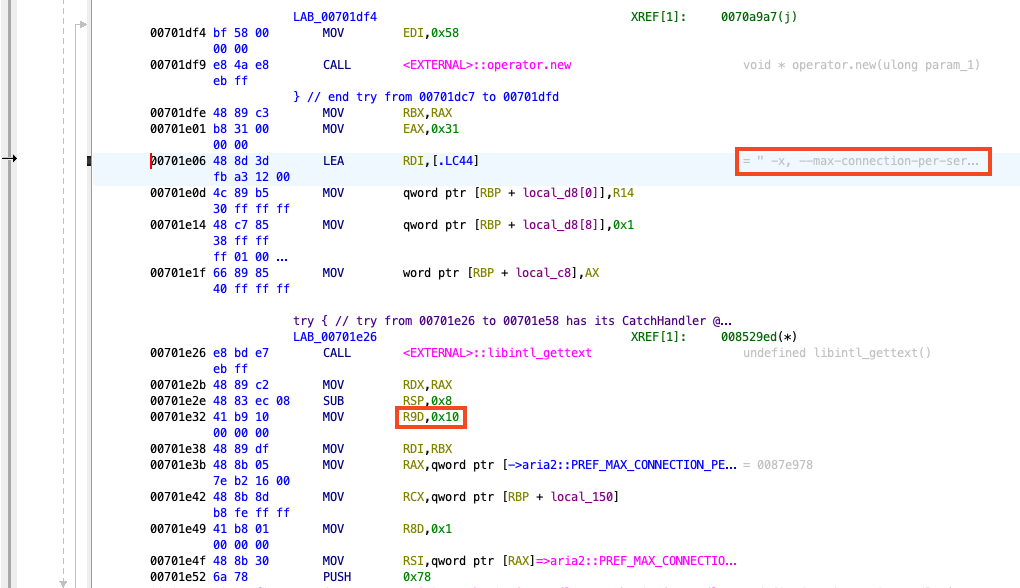
And what do we see there a few lines below? It’s a 0x10, surely that’s our 16 being moved into register R9D. Let’s change it by right clicking it and selecting 'Patch Instruction'. You can set it to whatever you want, but I’m going to put 0xff. That’s 255 in decimal.

Now we save our change via File→Export Program… The format list is a bit unclear, with people online saying to select 'PE' which isn’t on the list. I used 'Original File', but with 'Export User Byte Modifications' ticked in the options.
Now we got a copy of aria2c with the limit now at 255 connections per server!

Bonus Round: Unlimited Power#
You may notice the instruction specifies a 32 bit number, so you can put in 0xffffffff, giving a limit of 4294967295. But the options handler has a feature where a limit of -1 is interpreted as unlimited. That’s really what we want, how do we get the value to -1 though?
Turns out that register R9D is 64 bit, and the D on the end specifies the lower 32 bits.[3] Representing a negative number requires setting the highest bit to be 1, while the MOV to R9D zeros all of the higher 32 bits. An instruction to write -1, requires all 64 bits be set to 1 (0xffffffffffffffff). This requires writing to the complete R9 register. Bad news is that this needs an extra byte long instruction. Good news is that Ghidra is clever enough to lengthen the instruction for us.
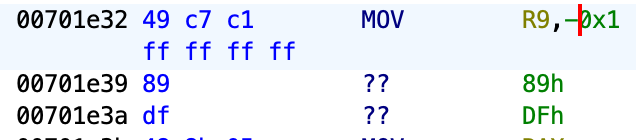
Now we have a truely unlimited connections per server:

Though you’re probably gonna run out of ephemeral ports before you get to 4294967295 TCP connections, this is just to make the hack as petty as possible.
Comment
- Username, 2026-01-27